 61f56f997c
5.8 KiB
A statically generated landing page using Next.js and Plasmic
This example showcases Next.js's Static Generation feature using Plasmic as the visual page builder.
You'll get:
- Statically generated pages from your visual designs
- Development server on preview mode watches for changes from Plasmic Studio
Demo
https://nextjs-plasmic-example.vercel.app/
Deploy your own
Once you have access to the environment variables you need, deploy the example using Vercel.
Related examples
- AgilityCMS
- Builder.io
- ButterCMS
- Contentful
- Cosmic
- DatoCMS
- DotCMS
- Drupal
- Enterspeed
- Ghost
- GraphCMS
- Kontent.ai
- MakeSwift
- Payload
- Plasmic
- Prepr
- Prismic
- Sanity
- Sitecore XM Cloud
- Sitefinity
- Storyblok
- TakeShape
- Tina
- Umbraco
- Umbraco heartcore
- Webiny
- WordPress
- Blog Starter
How to use
Execute create-next-app with npm, Yarn, or pnpm to bootstrap the example:
npx create-next-app --example cms-plasmic cms-plasmic-app
yarn create next-app --example cms-plasmic cms-plasmic-app
pnpm create next-app --example cms-plasmic cms-plasmic-app
Configuration
Step 1. Create an account and a project on Plasmic
First, create an account on Plasmic.
After creating an account, create a new project.
Step 2. Gather your project ID and API token
Once you've opened your Plasmic project, you can find the project ID in the URL: https://studio.plasmic.app/projects/PROJECTID.
The API token can be found by clicking the Code button in the top bar.
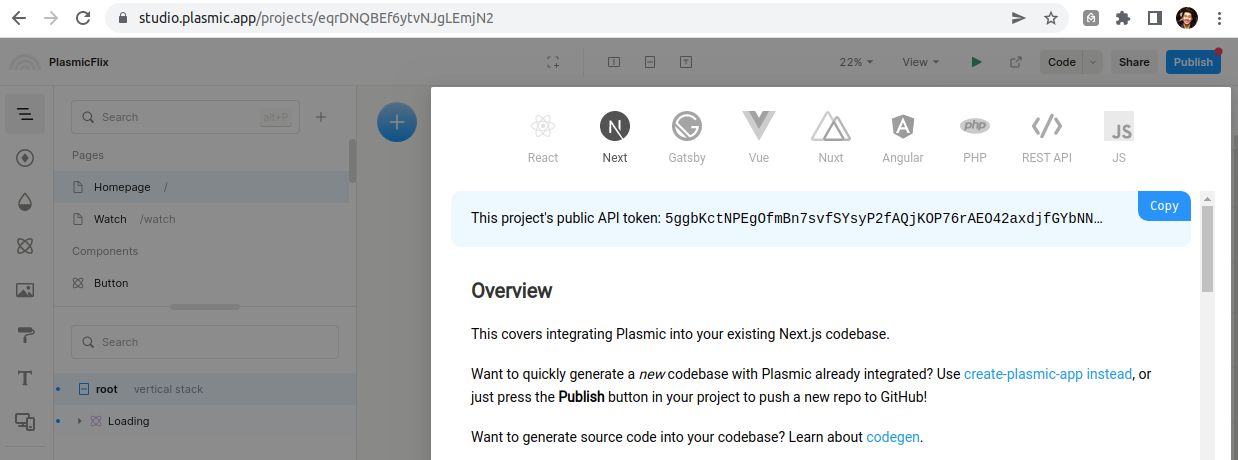
Step 3. Set up environment variables
Copy the .env.local.example file in this directory to .env.local (which will be ignored by Git):
cp .env.local.example .env.local
Then set each variable on .env.local:
NEXT_PUBLIC_PLASMIC_PROJECT_IDshould be theprojectIdvalue in step 2.NEXT_PUBLIC_PLASMIC_PROJECT_API_TOKENshould be the API token gathered in previous step.PLASMIC_PREVIEW_SECRETcan be any random string (but avoid spaces), likeMY_SECRET- this is used for Preview Mode.
Step 4. Run Next.js in development mode
npm install
npm run dev
# or
yarn install
yarn dev
Your blog should be up and running on http://localhost:3000! If it doesn't work, post on GitHub discussions.
Step 5. Try preview mode
By default, the code is set up to only build published Plasmic projects. If you want to see changes as you make them in the Plasmic Studio, enter preview mode by opening the following URL:
http://localhost:3000/api/preview?secret=PLASMIC_PREVIEW_SECRET&slug=PATH
Be sure to replace the secret with the chosen secret in Step 3 and pick a path to preview (e.g. http://localhost:3000/api/preview?secret=123456&slug=/)
Now you can make edits in the Studio and see them reflected in the development server live.
You can exit preview mode at any time by going to the following URL:
http://localhost:3000/api/exit-preview
Step 6. Deploy on Vercel
You can deploy this app to the cloud with Vercel (Documentation).
To deploy your local project to Vercel, push it to GitHub/GitLab/Bitbucket and import to Vercel.
Important: When you import your project on Vercel, make sure to click on Environment Variables and set them to match your .env.local file.
Next steps:
With Plasmic, you can enable non-developers on your team to publish pages and content into your website or app.
To learn more about Plasmic, take a look at the following resources:
You can check out the Plasmic GitHub repository - your feedback and contributions are welcome!