## Changes
- Adds the following high level access scopes, each with `read` and
`write` levels:
- `activitypub`
- `admin` (hidden if user is not a site admin)
- `misc`
- `notification`
- `organization`
- `package`
- `issue`
- `repository`
- `user`
- Adds new middleware function `tokenRequiresScopes()` in addition to
`reqToken()`
- `tokenRequiresScopes()` is used for each high-level api section
- _if_ a scoped token is present, checks that the required scope is
included based on the section and HTTP method
- `reqToken()` is used for individual routes
- checks that required authentication is present (but does not check
scope levels as this will already have been handled by
`tokenRequiresScopes()`
- Adds migration to convert old scoped access tokens to the new set of
scopes
- Updates the user interface for scope selection
### User interface example
<img width="903" alt="Screen Shot 2023-05-31 at 1 56 55 PM"
src="https://github.com/go-gitea/gitea/assets/23248839/654766ec-2143-4f59-9037-3b51600e32f3">
<img width="917" alt="Screen Shot 2023-05-31 at 1 56 43 PM"
src="https://github.com/go-gitea/gitea/assets/23248839/1ad64081-012c-4a73-b393-66b30352654c">
## tokenRequiresScopes Design Decision
- `tokenRequiresScopes()` was added to more reliably cover api routes.
For an incoming request, this function uses the given scope category
(say `AccessTokenScopeCategoryOrganization`) and the HTTP method (say
`DELETE`) and verifies that any scoped tokens in use include
`delete:organization`.
- `reqToken()` is used to enforce auth for individual routes that
require it. If a scoped token is not present for a request,
`tokenRequiresScopes()` will not return an error
## TODO
- [x] Alphabetize scope categories
- [x] Change 'public repos only' to a radio button (private vs public).
Also expand this to organizations
- [X] Disable token creation if no scopes selected. Alternatively, show
warning
- [x] `reqToken()` is missing from many `POST/DELETE` routes in the api.
`tokenRequiresScopes()` only checks that a given token has the correct
scope, `reqToken()` must be used to check that a token (or some other
auth) is present.
- _This should be addressed in this PR_
- [x] The migration should be reviewed very carefully in order to
minimize access changes to existing user tokens.
- _This should be addressed in this PR_
- [x] Link to api to swagger documentation, clarify what
read/write/delete levels correspond to
- [x] Review cases where more than one scope is needed as this directly
deviates from the api definition.
- _This should be addressed in this PR_
- For example:
```go
m.Group("/users/{username}/orgs", func() {
m.Get("", reqToken(), org.ListUserOrgs)
m.Get("/{org}/permissions", reqToken(), org.GetUserOrgsPermissions)
}, tokenRequiresScopes(auth_model.AccessTokenScopeCategoryUser,
auth_model.AccessTokenScopeCategoryOrganization),
context_service.UserAssignmentAPI())
```
## Future improvements
- [ ] Add required scopes to swagger documentation
- [ ] Redesign `reqToken()` to be opt-out rather than opt-in
- [ ] Subdivide scopes like `repository`
- [ ] Once a token is created, if it has no scopes, we should display
text instead of an empty bullet point
- [ ] If the 'public repos only' option is selected, should read
categories be selected by default
Closes#24501Closes#24799
Co-authored-by: Jonathan Tran <jon@allspice.io>
Co-authored-by: Kyle D <kdumontnu@gmail.com>
Co-authored-by: silverwind <me@silverwind.io>
The PKCE flow according to [RFC
7636](https://datatracker.ietf.org/doc/html/rfc7636) allows for secure
authorization without the requirement to provide a client secret for the
OAuth app.
It is implemented in Gitea since #5378 (v1.8.0), however without being
able to omit client secret.
Since #21316 Gitea supports setting client type at OAuth app
registration.
As public clients are already forced to use PKCE since #21316, in this
PR the client secret check is being skipped if a public client is
detected. As Gitea seems to implement PKCE authorization correctly
according to the spec, this would allow for PKCE flow without providing
a client secret.
Also add some docs for it, please check language as I'm not a native
English speaker.
Closes#17107Closes#25047
Backport #24925, partially backport #24934
(`docs/content/doc/help/faq.zh-cn.md` file)

Part of backport has already done by #24942

Also backport #24881 to avoid "deadlock"

---------

Co-authored-by: Zettat123 <zettat123@gmail.com>
It's been disabled by default since 1.17
(https://github.com/go-gitea/gitea/pull/18914), and it never really
delivered any benefit except being another cache layer that has its own
unsolved invalidation issues. HTTP cache works, we don't need two cache
layers at the browser for assets.

## ⚠️ BREAKING

You can remove the config `[ui].USE_SERVICE_WORKER` from your `app.ini`
now.
This addressees some things from #24406 that came up after the PR was
merged. Mostly from @delvh.

---------

Co-authored-by: silverwind <me@silverwind.io>
Co-authored-by: delvh <dev.lh@web.de>
Backport #24979

Changes:

1. Use uniform links types relative to doc folder (start with `doc/`)
2. According to [docusaurus
links](https://docusaurus.io/docs/markdown-features/links), if `<a>` is
used, the `href` is resolved as URL location, but not file location. So
need to use `[text]({{< relref "path" >}})` instead.
Changes:

1. Use uniform links types relative to doc folder (start with `doc/`)
2. According to [docusaurus
links](https://docusaurus.io/docs/markdown-features/links), if `<a>` is
used, the `href` is resolved as URL location, but not file location. So
need to use `[text]({{< relref "path" >}})` instead.
As discussed in
https://github.com/go-gitea/gitea/pull/24953#issuecomment-1565630156.

## ⚠️ BREAKING ⚠️

1. The `ui.THEME_COLOR_META_TAG` setting has been removed. If you still
need to set the `theme-color` meta tag, add it via
`$GITEA_CUSTOM/templates/custom/header.tmpl` instead.

2. The non-standard `default-theme` meta-tag added in
https://github.com/go-gitea/gitea/pull/13809 has been removed. Third
party code that needs to obtain the currently loaded theme should use
the `theme-<name>` class on the `<html>` node instead, which reflect the
currently active theme.
# Main changes and Some notices
- Chines Docs should be put into corresponding versions' folders under `i18n/zh-cn/docusaurus-plugin-content-docs`. See [translate-markdown-files](https://docusaurus.io/docs/i18n/tutorial#translate-markdown-files) for reference. And also [srs-docs](https://github.com/ossrs/srs-docs) is a project that can be used as a reference. So changed the related paths in `loop_docs*` scripts.
- The markdown files under `docs/<version>` and `i18n/zh-cn/docusaurus-plugin-content-docs/<version>` must have the same name to be referred as translated. Files inside docs are corresponding to `current` version.
For example, `docs/administration/mail-templates.md` and `i18n/zh-cn/docusaurus-plugin-content-docs/current/administration/mail-templates.md`. Filename of `mail-templates.md` must be the same (cannot be `mail-templates.zh-cn.md` and `mail-templates.us-en.md`)
So trim the `.en-us.md` and `.zh-cn.md` to `.md` to ensure the same names inside `loop_docs*` scripts.
- Used `npx docusaurus write-translations --locale zh-cn` to do sidebar, footer, and header translations, so no need to keep `sideBarCN` anymore. [reference](https://docusaurus.io/docs/cli#docusaurus-write-translations-sitedir)
- Local Tests for `en` and `zh-cn` are separeted, run the following on local respectly to test them
```bash
# test en version
npm run start
# test zh-cn version
npm run start -- --locale zh-cn
```
- If wants to test `en` and `zh-cn` both at the same time, run build and serve
```
npm run build
npm run serve
```
- Added some indexed page, for example:


Reviewed-on: https://gitea.com/gitea/gitea-docusaurus/pulls/13
Co-authored-by: HesterG <hestergong@gmail.com>
Co-committed-by: HesterG <hestergong@gmail.com>
This adds the ability to pin important Issues and Pull Requests. You can
also move pinned Issues around to change their Position. Resolves#2175.
## Screenshots
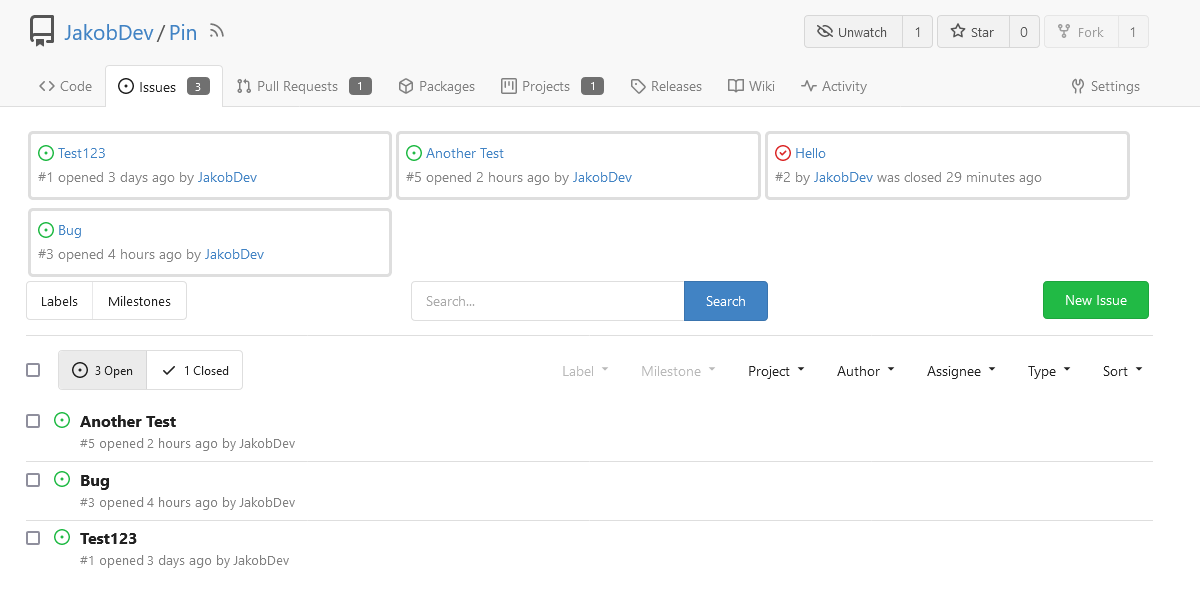
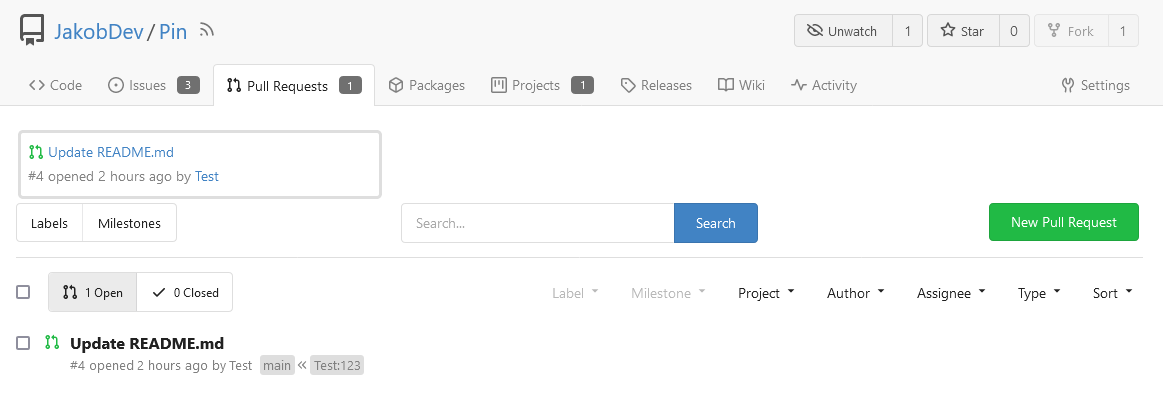
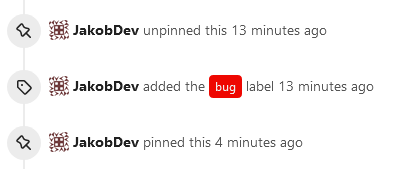
The Design was mostly copied from the Projects Board.
## Implementation
This uses a new `pin_order` Column in the `issue` table. If the value is
set to 0, the Issue is not pinned. If it's set to a bigger value, the
value is the Position. 1 means it's the first pinned Issue, 2 means it's
the second one etc. This is dived into Issues and Pull requests for each
Repo.
## TODO
- [x] You can currently pin as many Issues as you want. Maybe we should
add a Limit, which is configurable. GitHub uses 3, but I prefer 6, as
this is better for bigger Projects, but I'm open for suggestions.
- [x] Pin and Unpin events need to be added to the Issue history.
- [x] Tests
- [x] Migration
**The feature itself is currently fully working, so tester who may find
weird edge cases are very welcome!**
---------
Co-authored-by: silverwind <me@silverwind.io>
Co-authored-by: Giteabot <teabot@gitea.io>
1. non-dev mode is treated as prod mode, to protect users from
accidentally running in dev mode if there is a typo in this value.
2. in dev mode, do not need to really exit if there are template errors,
because the template errors could be fixed by developer soon and the
templates get reloaded, help:
* https://github.com/go-gitea/gitea/issues/24845#issuecomment-1557615382
3. Fine tune the mail template loading message.
The cheat sheet uses the `asciidoc` markup language to demonstrate how
to set up third party markup renderers. The current example has the
following issues:

- It promotes a legacy tool that does not handle modern AsciiDoc
specifications
- It does not account for embedded preview renders
- It has no safety restrictions

By switching to `asciidoctor`, uses are suggested to utilize de
facto/standard tooling for AsciiDoc.

The `--embedded` parameter will strip out HTML tags that contain the
document (such as `<html></html>`) which aren't necessary for the
render, and actually end up as text in the document if left in.

The `--safe-mode` parameter (of which there are several profiles)
imposes [certain
policies](https://docs.asciidoctor.org/asciidoctor/latest/safe-modes/)
on the files it ingests and what the resulting output looks like. GitHub
itself uses the `secure` profile (the highest), which can be a good
starting point for those who are uncertain of what to do. By default, if
no mode is specified when `asciidoctor` runs it defaults to `unsafe`,
i.e. no safety guidelines at all.




